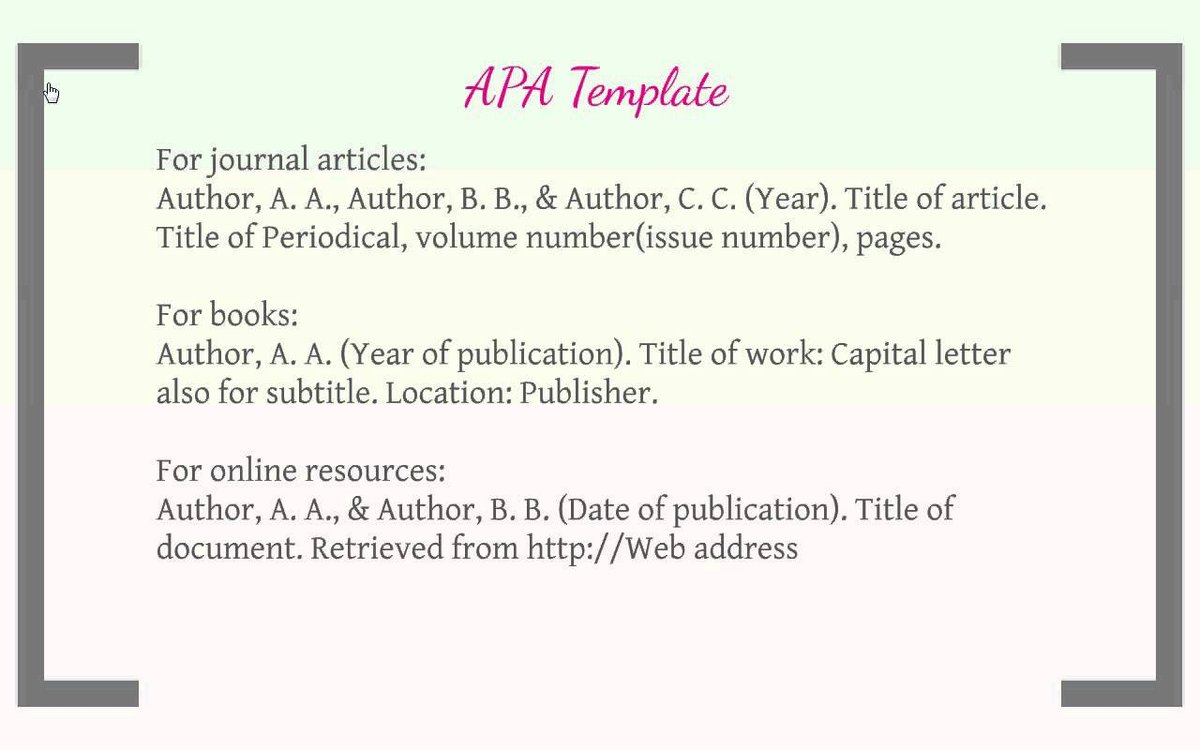
The dread of the reference list, the meticulous reformatting for a single misplaced comma, the sinking feeling when you realize you've mixed APA 6th and 7th editions – sound familiar? Crafting a perfectly formatted academic paper in APA style can feel like an arduous and error-prone side quest, stealing precious time from your actual research and writing. But what if there was a way to bypass this painstaking process, ensuring both accuracy and academic integrity with minimal effort?
That's where the right APA citation tool comes in. It’s not just about saving time; it's about safeguarding your academic reputation and ensuring your work stands on a foundation of impeccable source attribution. In this guide, we'll cut through the noise to help you understand, evaluate, and ultimately choose the APA citation tool that best fits your unique workflow and academic needs.
At a Glance: Key Takeaways
- APA citation tools are essential for academic integrity, preventing plagiarism, and saving significant time.
- They automate in-text citations and reference list entries, adhering to the latest APA 7th edition guidelines.
- Key selection factors include accuracy, usability, feature set, and compatibility with your existing tools (like Word or Google Docs).
- Free tools offer basic citation generation for common sources, while premium options provide advanced features like multiple styles, browser extensions, and integration with academic databases.
- Tools are especially helpful for complex citations, such as websites and ensuring consistent in-text citations.
Why APA Tools Are Non-Negotiable in Modern Academia
The American Psychological Association (APA) style is the gold standard for many disciplines, including psychology, education, and the social sciences. It's a structured system designed to ensure clarity, consistency, and proper attribution of sources. An APA citation isn't just a formality; it's a demonstration of your scholarship, showing readers exactly where your information comes from and allowing them to verify your research.
At its core, APA style involves two crucial components:
- In-text citations: These brief parenthetical references (typically author's last name, publication year) appear within the body of your paper, directly after quoted or paraphrased information. They act as signposts, guiding readers to the full source details.
- A comprehensive reference list: Located at the end of your paper, this list provides complete publication details for every source cited in your text. Each entry is meticulously formatted, including author names, publication dates, titles, and unique identifiers like DOIs or URLs.
Manually managing these elements for dozens, or even hundreds, of sources can be a nightmare. Even seasoned researchers can fall prey to subtle formatting errors that, while minor, can impact grades or publication chances. This is precisely why APA citation tools have become indispensable. They automate the heavy lifting, from autofilling reference list entries based on a URL or ISBN to ensuring every comma, period, and italicization adheres to the latest APA guidelines. This not only saves you countless hours but also acts as a programmatic safeguard against the plagiarism that often stems from accidental misattribution or forgotten citations.
The Anatomy of an APA Citation Tool: Free vs. Premium
Citation tools aren't one-size-fits-all. They range from simple web-based generators to robust, feature-rich platforms. Understanding the distinction between free and premium offerings is your first step in choosing wisely.
Free Generators: The Basics for Budget-Conscious Scholars
Most students and researchers start their journey with free APA citation generators, and for good reason. They provide a solid foundation for basic citation needs without a financial commitment.
These tools typically excel at:
- Auto-generating citations: For common source types like books, journal articles, and websites, you can often paste a URL or input a DOI, and the tool will pull the relevant metadata.
- Copy/paste functionality: Once generated, you can simply copy the formatted citation and paste it directly into your reference list.
- Basic source editing: If the auto-fill isn't perfect, you can manually tweak fields like author names, titles, or dates.
- Limited citation styles: Often, free tools specialize primarily in APA, sometimes offering MLA or Chicago as well, but usually not an extensive list.
- Manual entry: For more obscure sources or when metadata is missing, you'll enter all details by hand.
While incredibly helpful for quick one-off citations, free tools often require more manual oversight and may lack the depth needed for complex research projects or integrated workflows.
Premium Powerhouses: Unlocking Advanced Efficiency
For serious academic work, extended research projects, or if you simply value a seamless, error-reduced workflow, premium APA citation tools are worth considering. These platforms take the foundational capabilities of free tools and layer on a host of advanced features designed to save you even more time and ensure greater accuracy.
Expect to find features such as:
- Support for multiple citation styles: Beyond APA, you'll likely get MLA, Chicago, Harvard, and hundreds of others.
- Creation of in-text citations: These tools don't just format your reference list; they can also generate the correct in-text parenthetical citations, often allowing you to insert them directly into your word processor.
- Annotation capabilities: Some tools allow you to add notes and highlights to your sources, linking them directly to your citations.
- Advanced editing and customization: Greater flexibility to fine-tune citations, handle special cases (e.g., dissertations, legal documents), and ensure every detail is perfect.
- Automatic bibliography generation: Build your reference list as you go, and the tool will compile and format the entire list with a single click at the end.
- Browser extensions: These handy add-ons let you capture citation data from webpages with a click as you browse, making source collection incredibly efficient.
- Batch citing: Add multiple sources at once, often by uploading a file or linking to an academic database.
- Seamless integration: Many premium tools integrate directly with popular academic databases (like JSTOR or Google Scholar) and word processors (Microsoft Word, Google Docs). This means you can often add sources to your reference library directly from search results and insert in-text citations without ever leaving your writing environment.
The investment in a premium tool often pays dividends in reduced stress, improved accuracy, and significantly reclaimed time, contributing to a smoother research and writing process.
Beyond the Basics: Key Factors to Look for in Your APA Tool
Choosing the right tool isn't just about features; it's about finding one that aligns with your specific needs and workflow. Here are the critical factors to weigh:
Accuracy Above All: APA 7th Edition Compliance
This is non-negotiable. APA style evolves, and the 7th edition introduced significant changes. An outdated tool that still generates APA 6th edition citations is not just unhelpful; it's detrimental. Ensure your chosen tool explicitly states its compliance with the latest APA 7th edition guidelines.
This means it should:
- Correctly format author names (e.g., using "et al." for three or more authors in in-text citations from the first mention for some source types, or for 21 or more authors in the reference list).
- Properly handle DOIs and URLs, including the specific phrasing for retrieving online sources.
- Accurately format different source types (e.g., books, journal articles, web pages, videos, social media posts) according to APA 7th edition rules.
- Understand nuances like the omission of "Retrieved from" for most URLs.
Your tool should be your reliable guardian against subtle but important formatting errors.
Effortless Usability: An Intuitive Interface
No matter how powerful a tool is, if it's frustrating to use, you won't stick with it. Look for:
- Clean design: A clutter-free interface that guides you clearly through the citation process.
- Simple input: Easy ways to add sources, whether by pasting a URL, DOI, ISBN, or manually entering details.
- Clear output: Citations that are easy to review, edit, and export.
- Help and support: Accessible tutorials, FAQs, or customer support for when you hit a snag.
An intuitive tool minimizes the learning curve and maximizes your efficiency.
Comprehensive Features: What You Truly Need
Reflect on your typical research process.
- Do you need more than just reference list entries? If so, prioritize tools that generate accurate in-text citations and allow for easy insertion into your document.
- Are you frequently citing obscure sources? Look for advanced editing capabilities and robust manual entry options.
- Do you work across multiple academic disciplines? A tool supporting various citation styles will be invaluable.
- How do you gather sources? Browser extensions for quick web captures, or direct integration with academic databases, can be huge time-savers.
- Do you often reuse sources across papers? A personal citation library or project-based organization features can be very helpful.
Don't overpay for features you'll never use, but don't under-equip yourself either.
Seamless Compatibility: Integrating with Your Workflow
Your citation tool shouldn't be an island. The best tools fit neatly into your existing academic ecosystem.
- Word Processor Integration: If you primarily write in Microsoft Word or Google Docs, choose a tool with direct add-ins or extensions that allow you to insert citations and build bibliographies without switching applications.
- Operating System: Ensure the tool is compatible with your device, whether that's Windows, macOS, or a web-based solution.
- Reference Managers: If you already use a reference manager like Zotero or Mendeley, some citation tools can integrate with these, streamlining your entire research pipeline.
The less friction between your tools, the more productive you'll be.
Tackling the Tricky Bits: How Tools Handle Complex Citations
While basic book or journal article citations are relatively straightforward, APA style throws curveballs with specific source types. This is where a robust citation tool truly shines.
Mastering In-Text Citations
In-text citations are the bread and butter of academic writing, yet research indicates over 80% of students make mistakes with them. Common errors include inconsistent author formatting, missing publication years, incorrect punctuation, or mismatches between in-text citations and the reference list.
Good APA tools programmatically safeguard against these issues. They:
- Automatically extract the necessary author and year information.
- Format parenthetical citations (Author, Year, p./pp. #) correctly, often with options for narrative citations (Author (Year) stated...).
- Assign unique identifiers to link each in-text citation directly to its corresponding entry in your reference list, ensuring perfect consistency and preventing orphaned citations.
- Help you navigate specific rules, like how to cite multiple authors, corporate authors, or sources with no identified author.
Conquering Website Citations
Citing online sources can be particularly challenging due to their dynamic nature. Missing authors or dates, frequently changing content, and unwieldy URLs are common hurdles. This is where an advanced APA website citation generator becomes invaluable.
APA tools address these complexities by:
- Smart data extraction: They attempt to parse website metadata to find authors, dates, and titles, even if not immediately obvious.
- Handling missing information: They guide you on using "n.d." (no date) or the organization as the author when individual author names are absent, adhering to APA rules.
- Correct formatting: They ensure the main page title is correctly formatted, and that URLs are properly included.
- Storing citation data: They store the information at the time of citation, creating a snapshot for your reference.
Best practices for website citations, automated by these tools, involve: - Using the author's real name or organization.
- Including the full date published (or n.d. if unavailable).
- Using the main page title (adding a content description in brackets if needed, e.g., [Blog post]).
- Providing the full URL, and using permalinks or shorteners if the tool supports it to ensure longevity.
By automating these steps, tools dramatically reduce the headaches associated with citing online resources.
Making the Switch to APA 7th Edition? Your Tool Can Help
If you're transitioning from APA 6th to 7th edition, the process can feel daunting. The good news is that a quality APA 7 citation generator can be your best ally.
Here are some tips for a smooth transition:
- Use your APA 7 citation generator to reformat old citations: If you have an existing reference list in APA 6th, many tools allow you to import and update the style, flagging areas that need review.
- Double-check APA 6th citations for significant changes: Pay close attention to author counts in in-text citations, the removal of "Retrieved from," and the new format for DOIs. Your tool will highlight these discrepancies.
- Consult the latest APA 7th style guide: Even with a tool, a basic understanding of the guidelines empowers you to spot errors and make informed decisions for unique sources.
- Utilize support teams: If your premium tool offers support, don't hesitate to ask for help with specific APA 7th edition questions.
- Gradually integrate new APA 7th citations: As you research, focus on generating new citations directly in APA 7th edition rather than trying to update everything at once.
How to Use an APA Citation Generator: A Step-by-Step Walkthrough
While specific interfaces vary, the general workflow for most APA citation generators is remarkably similar. Let's walk through a typical process, using a popular example like MyBib:
- Select Your Source Type: Most tools will ask you to identify the type of source you're citing first (e.g., book, journal article, website, video). This helps the tool anticipate the necessary fields.
- Search for the Source (or Manual Entry):
- For common sources (books, articles): You'll usually enter an ISBN, DOI, or article title. The tool then searches its database or academic repositories to pull relevant metadata.
- For websites: You'll paste the URL. The tool will then attempt to scrape the page for author, date, and title.
- For unique or obscure sources: You'll choose "Manual Entry" and fill in the fields yourself.
- Review and Add Missing Details: The tool will present the information it found. Always review this carefully! Auto-fill isn't perfect, especially for older or less structured sources. Add any missing author names, publication dates, page numbers, or other crucial elements. This step is vital for accuracy.
- Generate the Citation: With all the necessary information, click "Generate" (or a similar button). The tool will instantly create the fully formatted APA 7th edition reference list entry.
- Add to Your Bibliography/Reference List: The generated citation will be added to a running list within the tool. Repeat steps 1-4 for each source you use.
- Download Your Formatted List: Once you've added all your sources, the tool will compile them into a perfectly formatted and alphabetized reference list. You can then download this list (often in Word, PDF, or plain text format) and append it directly to your paper.
It's a straightforward process that significantly reduces the time and mental load of citation management.
Choosing Your Champion: A Comparison Checklist
When you're ready to select an APA 7 citation generator, having a clear comparison framework is essential.
Use these points to evaluate leading tools like Yomu AI, EasyBib, Citation Machine, Scribbr, and MyBib:
| Feature/Criterion | Free Tier Considerations | Premium Tier Considerations |
|---|---|---|
| Citations per month limits | Often capped at a few dozen; might require account creation. | Unlimited or very high caps. |
| Accuracy across source types | Generally good for common sources; may struggle with nuanced or less common types. | High accuracy across a vast array of source types; robust handling of special cases. |
| Breadth of supported materials | Primarily books, journal articles, websites. | Extensive: Books, articles, websites, social media, videos, dissertations, legal documents, conference papers, etc. |
| Platform compatibility | Web-based (browser dependent). | Web-based, dedicated desktop apps, browser extensions, Word/Google Docs add-ins. |
| User interface & ease of use | Varies widely; some can be cluttered with ads. | Generally clean, intuitive, and ad-free; often includes tutorials and clear guidance. |
| In-text citation generation | Usually manual or very basic. | Automated and integrated, often with direct insertion into word processors. |
| Integration with databases | None. | Seamless integration with academic databases (JSTOR, Google Scholar) and reference managers. |
| Customization & editing | Basic editing of auto-generated fields. | Advanced customization, field validation, and error flagging. |
| Customer Support | Community forums, limited FAQs. | Dedicated support teams, live chat, comprehensive knowledge bases. |
| Plagiarism Checker | Not typically included. | Often bundled as an additional feature or paid add-on. |
| By systematically comparing these points against your own needs, you'll be well-equipped to pick the tool that truly streamlines your research. |
The Future is Now: What's Next for Citation Tools?
The landscape of APA citation tools is constantly evolving. We can expect even more sophistication in the years to come:
- More accurate auto-generation from URLs and PDFs: Advancements in AI and natural language processing will lead to near-perfect extraction of metadata from complex web pages and research papers.
- Improved plagiarism checking: Tighter integration of citation generation with robust plagiarism detection will offer a comprehensive academic integrity suite.
- Wider integration with writing apps and reference managers: Expect even deeper hooks into tools like Notion, Scrivener, and other niche academic platforms, creating a truly unified writing and research environment.
- Personalized citation guidance: AI-driven assistants might offer real-time feedback and suggestions based on your writing style and specific assignment requirements.
These innovations promise an even more seamless, error-proof future for academic writing.
The Bottom Line: Your Path to Academic Integrity and Efficiency
Choosing the right APA citation tool isn't just about convenience; it's about empowerment. It liberates you from the tedious minutiae of formatting, allowing you to dedicate your energy to critical thinking, thorough research, and compelling writing – the true hallmarks of academic excellence.
By understanding the distinct advantages of free versus premium options, prioritizing accuracy and usability, and selecting a tool that integrates flawlessly with your workflow, you’ll not only save considerable time but also ensure your citations are consistently perfect, contributing to higher grades and a stronger academic reputation. Take the time to evaluate your options, try out a few, and invest in a tool that becomes a true partner in your academic journey. Your future self (and your professors) will thank you.